You asked your team to patch everything before the quarter closed, and they did. The vulnerability scanner came back mostly green, the ticket queue is empty, and yet something nags at you: nobody has actually looked at the whole picture in months. Which firewall rules were opened for that contractor in March and never closed? Is the staging database still reachable from the public internet? Does your DDoS protection actually activate before traffic saturates your pipe, or does it kick in after the outage?
That gap between "we patch things" and "we know our security posture" is exactly what a cloud security audit closes. And in 2026, closing it is not optional. Roughly 80% of organizations reported at least one cloud security incident in the past 12 months, and about 45% of all data breaches now involve cloud environments, according to compiled industry statistics from StationX. Regulators have noticed too, which is why frameworks like ISO 27001, SOC 2, and GDPR now show up in procurement conversations far earlier than they used to.
Key takeaways:
- Around 80% of organizations reported at least one cloud security incident in the past year, and roughly 45% of data breaches involve cloud environments.
- A practical cloud security audit follows seven steps: inventory, segmentation, firewall and WAF testing, DDoS validation, identity hardening, backup verification, and compliance mapping.
- Reactive DDoS protection loses the first minutes of every attack; always-on mitigation is the 2026 baseline.
- The mature pattern is continuous automated auditing, with the human audit focused on reviewing exceptions rather than discovery.
The good news is that a solid audit is a repeatable process, not a heroic project. This guide walks you through a seven-step checklist you can run on your own infrastructure, whether you run on a hyperscaler, a private cloud, or a mix of both.
Table of Contents
- Why Cloud Security Audits Are No Longer Optional in 2026
- The Expanding Cloud Attack Surface: What the Numbers Say
- Step 1: Inventory Your Attack Surface (Servers, Firewall Rules, Open Ports)
- Step 2: Review Network Segmentation Across Public, Private, VPN, DMZ, and Management Zones
- Step 3: Audit Your Firewall and WAF Configuration Against the OWASP Top 10
- Step 4: Validate DDoS Mitigation Is Always-On, Not Reactive
- Step 5: Check Identity and Access with Least Privilege and Credential Rotation
- Step 6: Verify Backup Integrity and Test Your RPO and RTO Targets
- Step 7: Map Your Posture Against ISO 27001, SOC 2, and GDPR Requirements
- How to Automate Continuous Security Auditing Instead of Doing It Quarterly
- Downloadable Cloud Security Audit Checklist
Why Cloud Security Audits Are No Longer Optional in 2026
Three forces have converged to make periodic audits a baseline expectation rather than a best practice.
First, the threat economics changed. Attackers no longer need to be sophisticated to be effective. Ransomware-as-a-service, credential stuffing at scale, and automated vulnerability exploitation mean that a misconfigured S3 bucket or a forgotten firewall rule gets found within hours, not weeks. The 2026 forecasts from Qualys point to identity attacks and supply-chain compromise as the dominant risk vectors, both of which exploit configuration drift that only an audit catches.
Second, compliance frameworks now demand evidence, not intentions. ISO 27001 audits, SOC 2 Type II reviews, and GDPR assessments all require you to demonstrate that controls exist and operate continuously. A checklist-driven audit produces exactly the documentation trail auditors want to see. If you are weighing which framework to pursue first, our breakdown of ISO 27001 vs SOC 2 for cloud businesses covers how to choose a path and use your infrastructure as evidence.
Third, your customers are auditing you whether you like it or not. Security questionnaires, penetration test reports, and architecture reviews are now standard parts of enterprise deals. Having a current internal audit on file shortens those cycles dramatically.
The Expanding Cloud Attack Surface: What the Numbers Say
Before touching any systems, it helps to understand what you are actually defending. The attack surface of a typical mid-market company has grown far faster than the security team responsible for it.
- Multi-cloud sprawl. Most organizations now run workloads across two or more providers, each with its own IAM model, network fabric, and logging format.
- API exposure. Every SaaS integration, webhook, and customer-facing API is an entry point. Machine identities now outnumber human identities in most environments by a wide margin.
- Ephemeral workloads. Containers and serverless functions spin up and down faster than traditional change-management processes can track.
- Remote access paths. VPN concentrators, bastion hosts, and remote desktop gateways remain among the most targeted assets because they sit deliberately at the edge.
The pattern across recent breach post-mortems is consistent: the exploited weakness was known, documented somewhere, and simply never fixed because nobody owned it. An audit's real job is assigning ownership. That is also why DataBank's 2026 compliance outlook emphasizes continuous configuration validation over point-in-time reviews, a theme we will return to at the end of this guide.
Step 1: Inventory Your Attack Surface (Servers, Firewall Rules, Open Ports)
You cannot secure what you do not know exists. The first step is building (or refreshing) a complete inventory, and it is worth being slightly paranoid about completeness.
Start with the obvious:
- Every VM, container host, and bare-metal server, with owner, environment (production, staging, dev), and data classification.
- Every public IP address and DNS record, including the ones someone spun up for a demo two years ago.
- Every open port and listening service. This is where automation pays off:
# Quick external-facing scan from a neutral vantage point
nmap -sV -p- --open <your-public-ip-range>

# List listening services on a single host
ss -tulpn
Every firewall rule, with creation date and justification. Most environments accumulate rules like scar tissue. A useful exercise: flag any rule older than six months without a named owner and challenge it.
Every third-party integration with credentials to your environment, including CI/CD pipelines and monitoring agents.
A practical trick: diff this quarter's inventory against last quarter's. Anything new that nobody can explain is your highest-priority finding, before any scanner even runs.
Step 2: Review Network Segmentation Across Public, Private, VPN, DMZ, and Management Zones
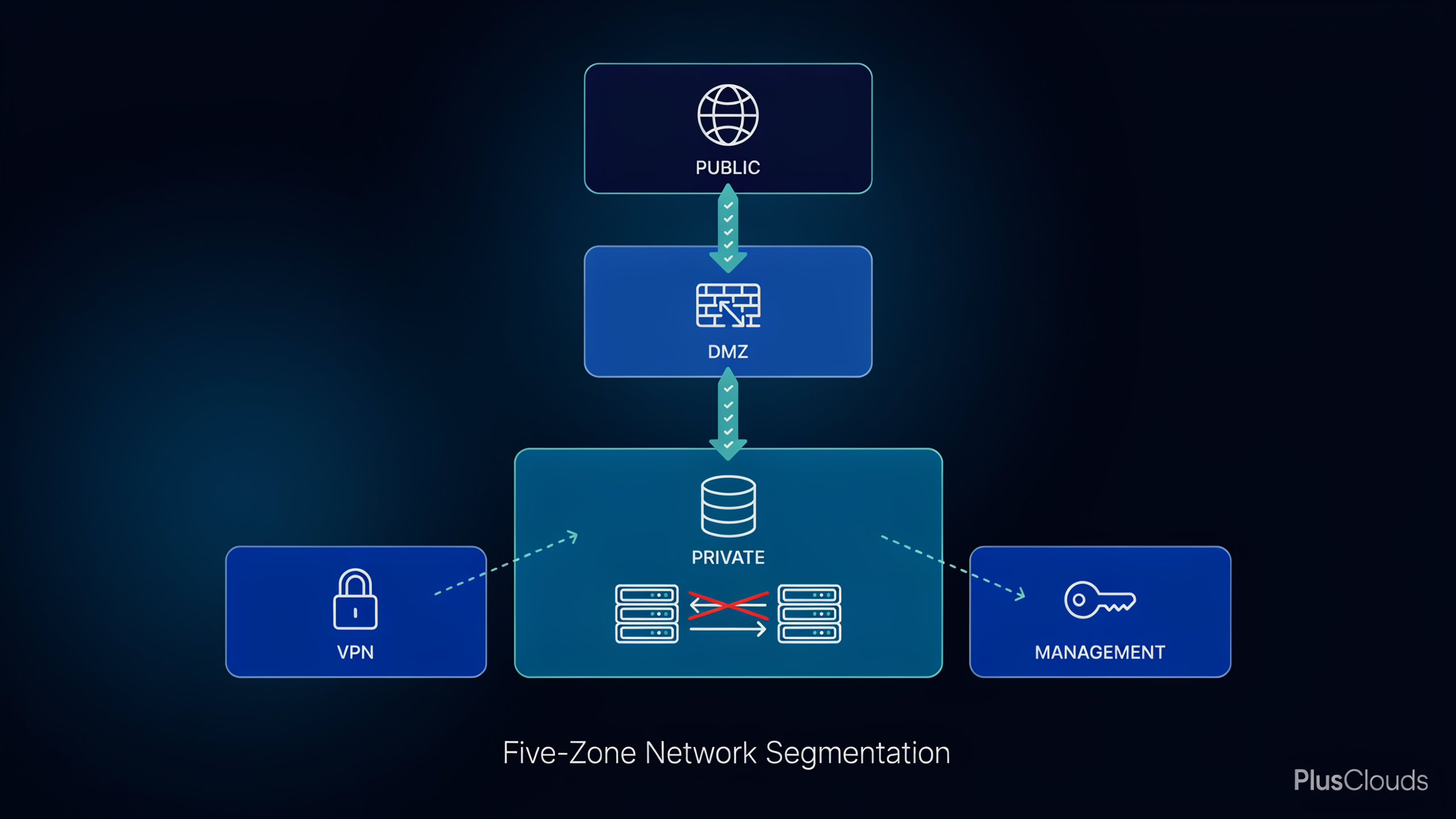
Flat networks are how a single compromised container becomes a full environment breach. Segmentation is the control that contains blast radius, and it is one of the most commonly failed audit items.
Map your environment against a five-zone model:
| Zone | What Lives There | Internet-Facing? |
|---|---|---|
| Public | Load balancers, web servers, WAF endpoints | Yes |
| DMZ | Proxies, mail relays, API gateways | Partially |
| Private | Application servers, databases, caches | No |
| Management | Bastion hosts, config management, monitoring | No |
| VPN | Remote access for staff and contractors | No |
Then verify the traffic rules between zones, not just the zones themselves. Databases should accept connections only from application subnets. Management interfaces should be reachable only through the VPN zone. The DMZ should be able to talk to the private zone on specific ports, not on all of them.
If your provider offers segmentation as a first-class construct, use it rather than hand-building it. PlusClouds' Networking & Load Balancers, for example, expose all five network types (public, private, VPN, management, and DMZ) from a single control plane, which makes the audit question "is segmentation consistent?" much easier to answer with a screenshot instead of a spreadsheet.
One more check: confirm that east-west traffic (server to server) is filtered, not just north-south. Lateral movement is the signature of nearly every serious cloud breach.
Step 3: Audit Your Firewall and WAF Configuration Against the OWASP Top 10
Your firewall and WAF are the two controls most likely to be configured once and forgotten. Audit both against the OWASP Top 10 as a baseline.
For the firewall:
- Default-deny inbound on every zone, with explicit allowances documented
- No
0.0.0.0/0allow rules on management ports (SSH, RDP, database ports) - Egress rules reviewed too; restricted egress limits what malware can exfiltrate
- Stateful inspection confirmed, since stateless rules miss half the attack classes
For the WAF, test rather than trust:
# Example: verify SQLi protection is actually blocking
curl -i "https://yourapp.example.com/products?id=1' OR '1'='1"

# Verify XSS filtering
curl -i "https://yourapp.example.com/search?q=<script>alert(1)</script>"
Expect a blocked response (403 or a challenge page), not a 200. Run a quick check for each OWASP category: injection, broken access control, cryptographic failures, SSRF, and the rest. If your WAF is in "detection only" mode, decide deliberately whether that is intentional for each rule group, because "we never switched it on" is not a defensible answer in an incident review.
Payment-processing businesses have a stricter version of this exercise; our PCI DSS 4.0.1 compliance guide breaks down the specific firewall, WAF, and segmentation controls that card-data environments must evidence.
Step 4: Validate DDoS Mitigation Is Always-On, Not Reactive
Here is a question worth asking your provider this week: "When does my DDoS protection activate?" If the answer involves a human noticing an alert and calling someone, you have a reactive posture, and reactive means your first minutes of an attack are already lost.
An always-on mitigation layer scrubs traffic continuously, so volumetric attacks are absorbed before they reach your origin. The distinction matters because modern attacks are multi-vector: attackers hit layers 3, 4, and 7 simultaneously, so a volumetric flood masks an application-layer exploit attempt. We covered that pattern in depth in our guide to multi-vector DDoS defense across layers 3, 4, and 7.
For your audit checklist:
- Confirm mitigation capacity in concrete terms. PlusClouds' Cloud Security layer, for instance, provides always-on mitigation at over 1 Tbps, which is the order of magnitude where most volumetric attacks simply stop being your problem.
- Verify that a layer 7 flood against your login endpoint triggers rate limiting automatically.
- Check whether DNS, mail, and API endpoints are covered, not just your main website.
- Review your upstream provider's scrubbing SLA and ask for the last mitigation report.
Step 5: Check Identity and Access with Least Privilege and Credential Rotation
Identity is the new perimeter, and it is usually the messiest part of any audit. Work through these systematically:
- Enumerate every human and machine identity with access to production. Include CI/CD service accounts, which are frequently over-privileged and unmonitored.
- Enforce least privilege. Anyone with full-admin "because it was easier during setup" gets scoped down. Expect pushback; hold the line.
- Rotate credentials and keys. API keys older than 90 days, SSH keys without expiry, and shared passwords are automatic findings.
- Require MFA everywhere, especially on management consoles and VPN access.
- Review access logs for dormant accounts. An account that has not authenticated in 90 days should be disabled, not merely noted.
Zero-trust principles make this easier to sustain than periodic cleanups. If budget is the objection, our zero-trust on a budget guide shows how to harden identity and access without a six-figure security stack.
Step 6: Verify Backup Integrity and Test Your RPO and RTO Targets
Backups that have never been restored are hopes, not controls. This step is where audits earn their keep, because it converts a comforting assumption into a measured fact.
Run through this sequence:
- Confirm coverage. Every production data store, including databases, object storage, and configuration state.
- Verify immutability or isolation. At least one copy should be unreachable by the credentials an attacker would steal from production. The 3-2-1-1 backup rule is the reference architecture here: three copies, two media, one offsite, one immutable.
- Perform an actual restore. Pick a non-trivial dataset and restore it to a clean environment. Time it.
- Measure against your RPO and RTO. If your recovery point objective is 1 hour but your backup job runs every 24 hours, you have a documented gap. If your recovery time objective is 4 hours and the restore test took 9, same problem.
Automating this removes the human failure mode entirely. PlusClouds' Automated Backup handles scheduled recovery with explicit RPO/RTO targets and SLA tracking, plus remote restore, so the evidence an auditor asks for is generated continuously rather than assembled the week before the review. For teams operating under financial-sector regulation, our DORA Article 11 & 12 guide details how to design and document backup controls that survive a supervisory review.
Step 7: Map Your Posture Against ISO 27001, SOC 2, and GDPR Requirements
The final step ties your technical findings to the compliance frameworks your customers and regulators care about. You do not need to become a compliance expert; you need a traceability matrix that maps each audit finding to a control requirement.
| Audit Step | ISO 27001 Control | SOC 2 Criterion | GDPR Article |
|---|---|---|---|
| Inventory & asset management | A.5.9 (Inventory of assets) | CC6.1 | Art. 32 |
| Network segmentation | A.8.20-8.22 | CC6.6 | Art. 32 |
| Firewall/WAF | A.8.20 (Network security) | CC6.6 | Art. 32 |
| DDoS resilience | A.8.14 | A1.1 (Availability) | Art. 32 |
| Access control | A.5.15-5.18, A.8.2 | CC6.1-6.3 | Art. 25, 32 |
| Backup & recovery | A.8.13 | A1.5 | Art. 32 |
| Logging & monitoring | A.8.15-8.16 | CC7.1-7.2 | Art. 33 |
A few practical notes:
- ISO 27001 cares about your ISMS as a living system, so your audit report itself becomes Annex evidence.
- SOC 2 focuses on operational effectiveness over time, which means continuous monitoring evidence carries more weight than a single snapshot.
- GDPR Article 32 expects "appropriate technical measures," and segmentation, encryption, and tested recovery are the standard interpretations.
Sector-specific rules add layers: healthcare workloads face HIPAA's technical safeguards, which we covered in our HIPAA-compliant cloud infrastructure guide, and data sovereignty requirements may dictate where workloads physically run, as explored in our data sovereignty article.
How to Automate Continuous Security Auditing Instead of Doing It Quarterly
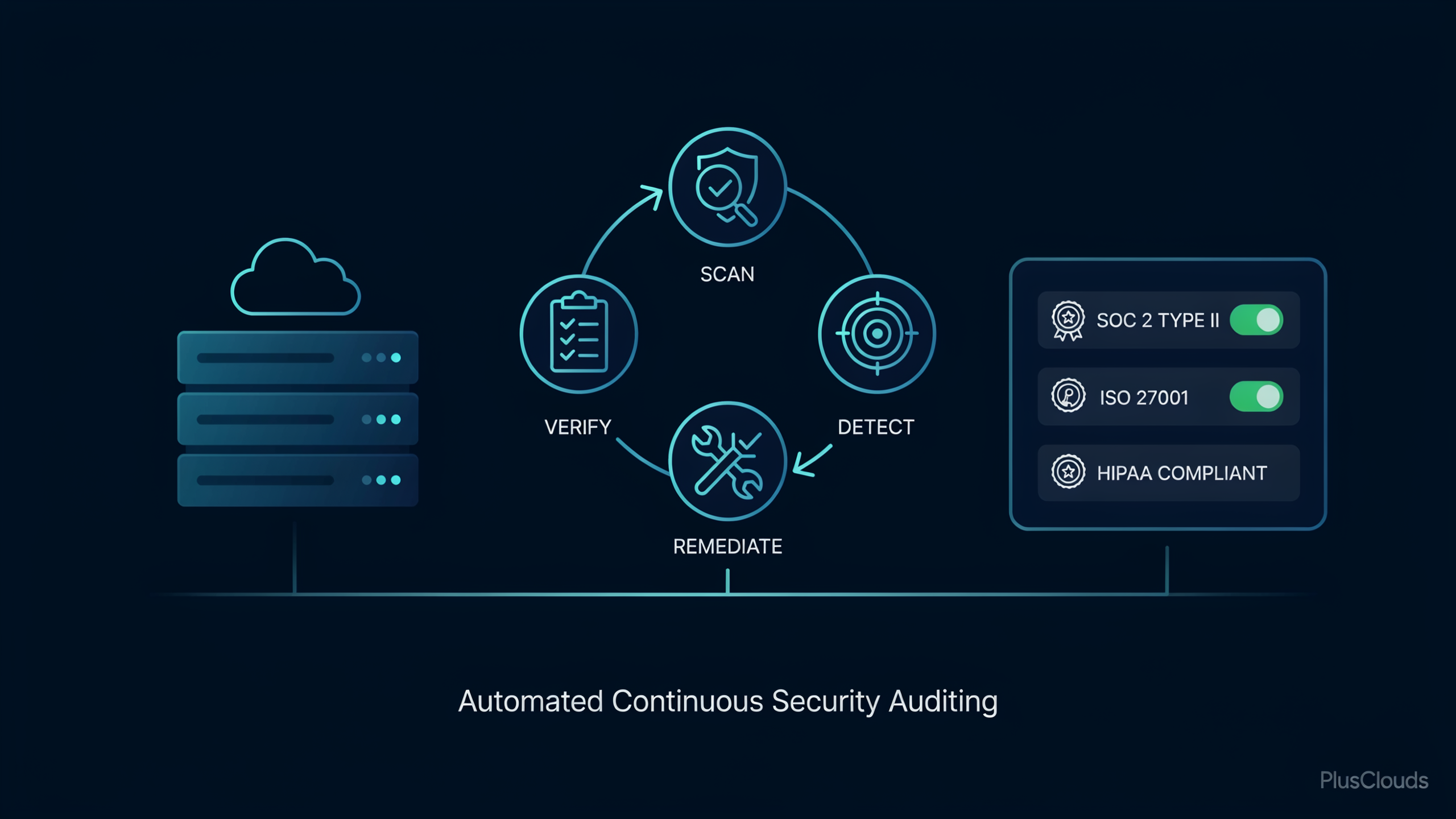
A quarterly audit is a photograph. Attackers operate on video. The mature pattern for 2026 is to automate the checks in this checklist so they run continuously, with the human audit becoming a review of exceptions rather than a discovery exercise.
Concretely:
- Configuration drift detection. Version-control your firewall and WAF rules; alert on any out-of-band change.
- Scheduled port and exposure scans. A weekly
nmapsweep of your public ranges, diffed against the last run, catches shadow infrastructure. - Access reviews on a timer. Quarterly credential rotation and dormant-account sweeps, triggered by calendar automation rather than memory.
- Continuous backup verification. Automated restore tests with results logged as compliance evidence.
- Compliance dashboards. Map the checks above to your ISO 27001/SOC 2 control matrix so evidence collection is a query, not a fire drill.
This is also where your infrastructure choice either helps or hurts. Running on a platform where the security layer (stateful firewall, WAF, always-on DDoS scrubbing) is managed and continuously validated by the provider, as with PlusClouds' Cloud Security offering, removes entire categories of checks from your own audit list. The same logic applies to the underlying compute: Cloud Servers with consistent baselines and full root access are far easier to audit than a heterogeneous mix of hand-built machines, and for workloads that demand hardware isolation, our comparison of multi-tenant cloud vs. single-tenant bare metal covers when the isolation model itself becomes a compliance requirement.
Downloadable Cloud Security Audit Checklist
Here is the condensed version of everything above, formatted so you can paste it into your ticketing system or governance wiki:
1. Attack Surface Inventory
- Complete asset inventory with owners and data classification
- Public IP and DNS record review
- Full external port scan, diffed against previous quarter
- Firewall rules older than 6 months challenged and re-owned
2. Network Segmentation
- Five-zone model documented (public, DMZ, private, management, VPN)
- Inter-zone traffic rules verified against least-privilege
- East-west filtering confirmed
- Management interfaces reachable only via VPN
3. Firewall & WAF
- Default-deny inbound on all zones
- No unrestricted management-port rules
- Egress filtering reviewed
- WAF tested against OWASP Top 10 categories with live requests
- WAF rule modes (blocking vs. detection) deliberately configured
4. DDoS Protection
- Mitigation confirmed always-on, not reactive
- Mitigation capacity documented (Tbps scale)
- Layer 7 rate limiting tested on authentication endpoints
- DNS, mail, and API endpoints covered
- Latest mitigation report obtained from provider
5. Identity & Access
- Full identity inventory including service accounts
- Least-privilege review completed
- Credentials older than 90 days rotated
- MFA enforced on all management surfaces
- Dormant accounts disabled
6. Backup & Recovery
- Coverage confirmed for all production data stores
- At least one immutable or isolated copy
- Live restore test performed and timed
- Measured RPO/RTO compared against documented targets
- Restore evidence archived for auditors
7. Compliance Mapping
- Findings mapped to ISO 27001 Annex A controls
- SOC 2 criteria cross-referenced
- GDPR Article 32 adequacy documented
- Sector-specific requirements (HIPAA, PCI DSS, DORA) assessed
Running this checklist once puts you ahead of most organizations your size. Running it continuously, with automation handling the repetitive checks and your team reviewing exceptions, puts you in a defensible position when the audit request, the regulator, or the attacker arrives, whichever comes first.
If you would rather have the firewall, WAF, DDoS mitigation, and backup layers validated continuously by your infrastructure provider instead of bolted on afterward, take a look at how PlusClouds bundles these controls into its cloud platform, or explore the datacenter architecture behind them. And if you want to see how the same platform handles the rest of your stack, from segmented networking to automated recovery, our team is happy to walk through your current setup and show where the gaps are.