You patched a firewall rule at 2 a.m. last quarter because an auditor flagged an open port. You documented it, closed the ticket, and moved on. Then someone asked the obvious question: why was that port open in the first place, and who else is quietly trusting the inside of your network right now?
That question is the whole point of zero trust. The model has moved from conference-slide aspiration to baseline expectation, driven by regulatory pressure, ransomware economics, and the simple fact that perimeter-based security stopped making sense the moment workloads moved outside the perimeter. The zero trust architecture market is valued at roughly $17.6 billion and growing at about 8.2% CAGR, according to Coherent Market Insights, and analysts tracking cloud security trends consistently rank zero trust among the top priorities for 2026 planning cycles.
But here's the practical problem: most zero trust content is theoretical. Identity-first this, policy engine that. What you actually need is a concrete answer to "what do I configure on Monday morning?" This guide walks through a layered implementation using the three controls you already have or should have: a stateful firewall, a web application firewall (WAF), and network segmentation, mapped onto a five-zone network architecture that keeps the whole thing manageable from a single control plane.
Key takeaways
- Zero trust in the cloud reduces to three rules: never trust by location, enforce least privilege at the network layer, and assume breach.
- A five-zone segmentation model (public, DMZ, private, management, VPN) is the practical starting point for most SMB and mid-market teams.
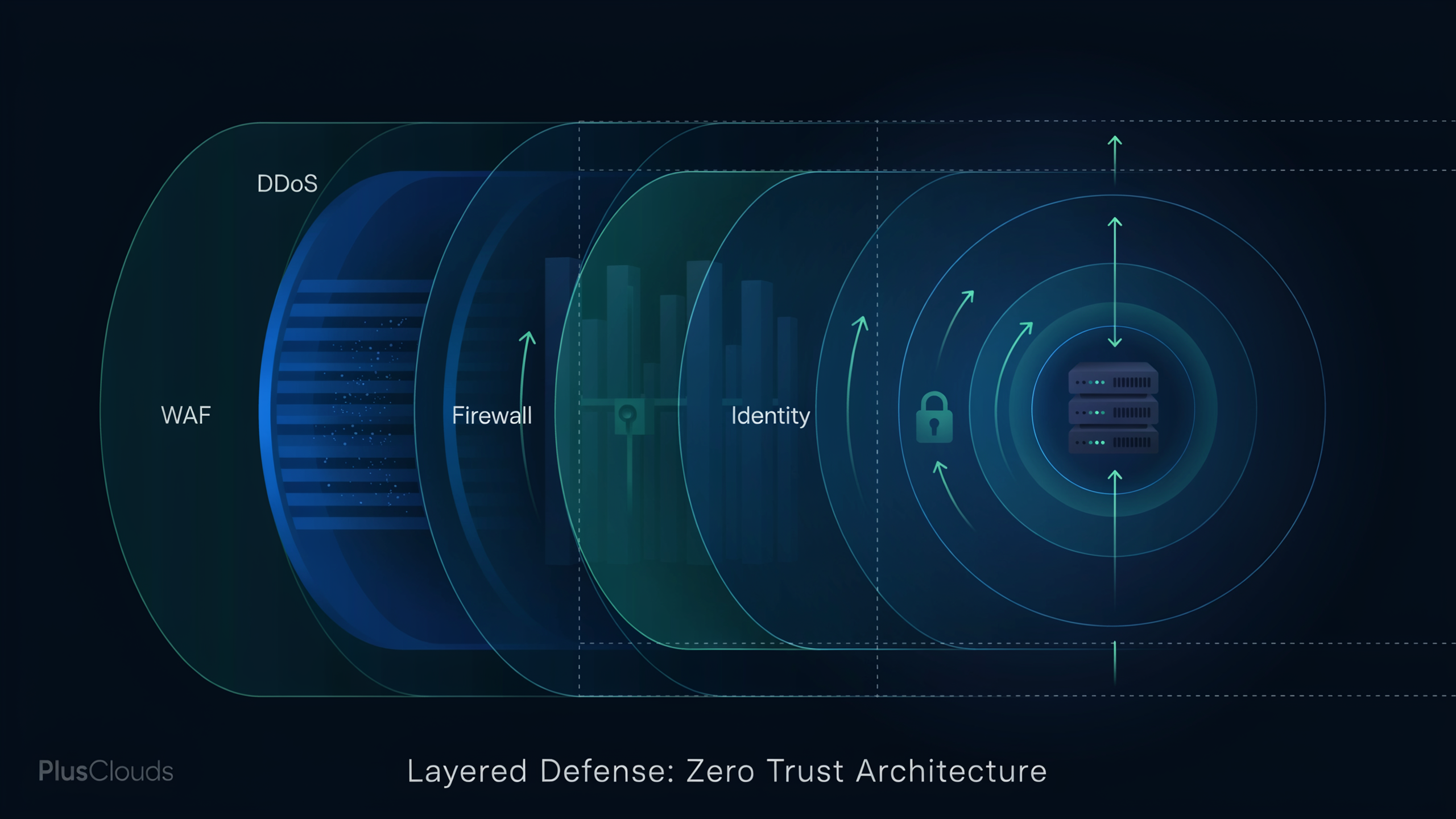
- Layer order matters: DDoS absorption at the edge, then WAF, then stateful firewall, then identity checks.
- Default-deny firewall rules with named owners and deny-log monitoring are what keep segmentation from quietly rotting.
- Zero trust is a continuous control loop, not a project with an end date; a quarterly audit of rules, flows, and deny logs keeps the posture real.
Table of Contents
- Why Zero Trust Has Moved from Aspiration to Baseline Requirement in 2026
- The Three Core Principles: Never Trust, Least Privilege, and Assume Breach, Applied to Cloud
- How Your Network Zones Map to Zero Trust Segments
- Stateful Firewall Rules That Enforce Least Privilege Between Zones
- Where WAF Fits in the Zero Trust Stack: Protecting Inbound HTTP/HTTPS Traffic at the Edge
- DDoS Mitigation as the Always-On Perimeter Layer Before Identity Checks Kick In
- Step-by-Step: Building a Zero Trust Network Blueprint on a Single Control Plane
- Common Implementation Mistakes and How to Avoid Them
- How to Audit and Continuously Verify Your Zero Trust Posture
- The Bottom Line: Layered Controls, One Place to Manage Them
Why Zero Trust Has Moved from Aspiration to Baseline Requirement in 2026
Three forces converged to make this shift.
First, the threat model changed. Attackers no longer "breach the perimeter and roam." They phish one credential, land on a laptop, and pivot laterally through flat internal networks. In a trust-based model, once they're inside, everything inside is reachable. In a zero trust model, every hop requires re-verification, which turns a single compromise into a contained incident instead of a company-wide one.
Second, regulation caught up. Frameworks like DORA in the EU, PCI DSS 4.0.1, HIPAA's updated Security Rule, and ISO 27001:2022 all now effectively require segmentation, least-privilege access, and continuous verification. If you're pursuing compliance in 2026, you're implementing zero trust whether you call it that or not. We've covered what this looks like for payment businesses in our PCI DSS 4.0.1 compliance guide, and the pattern repeats across every regulated industry.
Third, the economics flipped. Zero trust used to require a six-figure stack of appliances and consultants. Today, the core building blocks (stateful firewalls, WAFs, segmented networks, DDoS absorption) ship as standard features of competent cloud platforms. As we argue in Zero Trust on a Budget, an SMB can now implement a defensible architecture with tooling that's already in the bill.
The Three Core Principles: Never Trust, Least Privilege, and Assume Breach, Applied to Cloud
Zero trust gets over-intellectualized. In practice it reduces to three operating rules:
Never trust, always verify. No packet, request, or session is trusted based on where it comes from. A request from your "internal" app subnet to your database gets authenticated and authorized exactly like a request from a developer's laptop. Network location is not identity.
Least privilege, enforced at the network layer. Every workload should be able to reach exactly the destinations it needs, on exactly the ports and protocols it needs, and nothing else. Your billing service talks to the payment API over 443. It does not need to reach the internal DNS server, the backup network, or the admin jump host. If a rule can't justify itself in one sentence, delete it.
Assume breach. Design as though an attacker is already inside one of your segments. What can they reach from there? If the answer is "everything," your segmentation is decorative. The goal is blast-radius containment: a compromised container in the public zone should hit a wall the moment it tries to touch the management zone.
The bridge from principle to configuration is segmentation. That's where most implementations either succeed or quietly rot.
How Your Network Zones Map to Zero Trust Segments
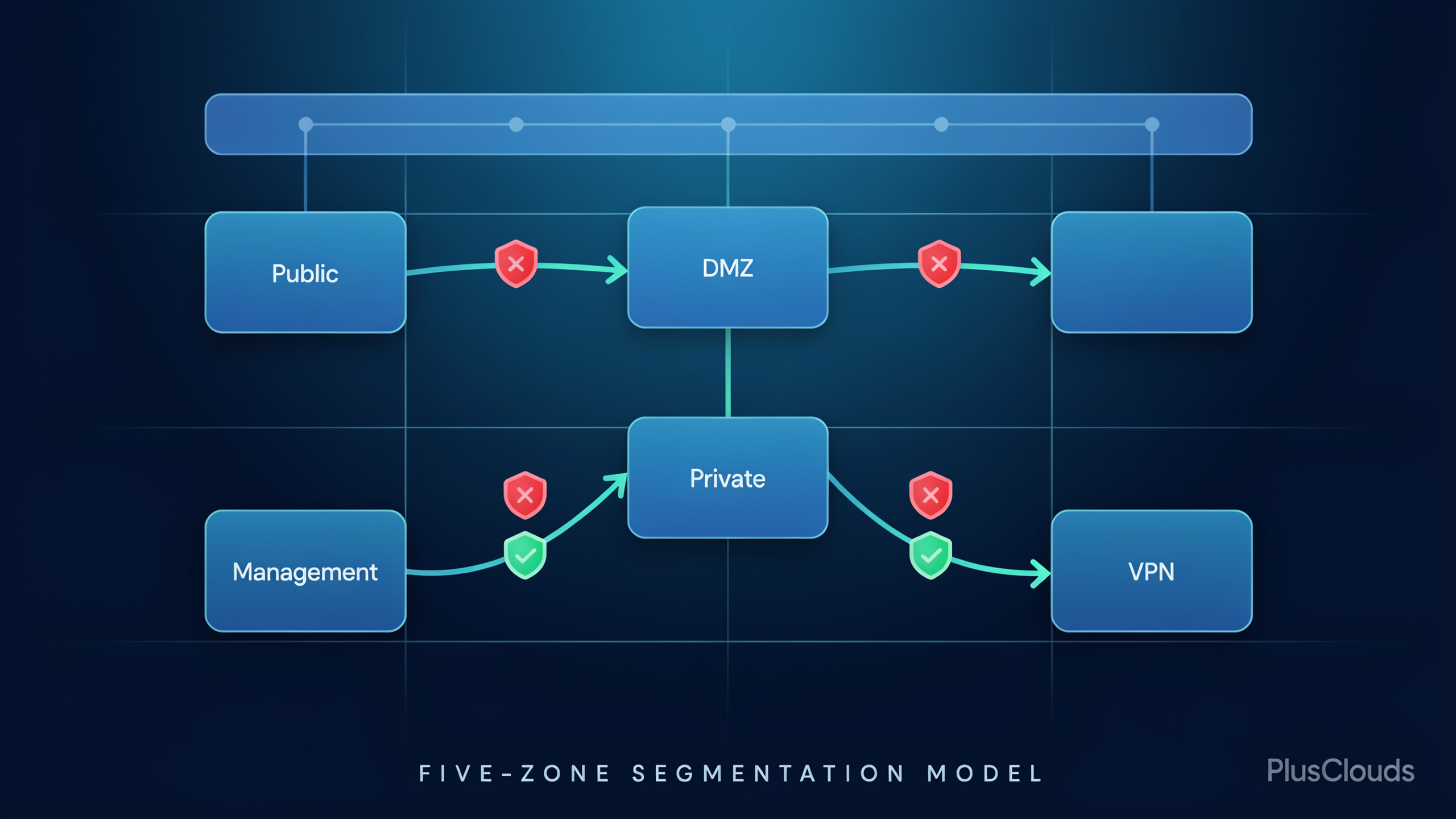
A five-zone architecture gives you a practical segmentation model that maps cleanly onto zero trust principles without requiring microsegmentation tooling you may not have yet:
| Zone | What Lives There | Trust Level | Default Posture |
|---|---|---|---|
| Public | Load balancers, web frontends, APIs | Untrusted-facing | Inbound: only 80/443 via WAF. Outbound: restricted |
| DMZ | Proxies, bastion services, mail relays | Semi-trusted | Isolated from private zone except explicit paths |
| Private | Application servers, caches, internal APIs | Trusted for app traffic only | No direct inbound from public |
| Management | Jump hosts, config management, monitoring | Highest sensitivity | Reachable only from VPN, MFA required |
| VPN | Remote access tunnel for humans | Authenticated identity | Gateway into management and private, per-role |
The key insight: zones are not trust levels, they're trust boundaries. Traffic crossing any boundary gets inspected and authorized. Traffic inside a zone still isn't automatically trusted if you can help it, but zone-level segmentation is the 80/20 of zero trust and the right starting point for most SMB and mid-market teams.
On platforms like PlusClouds, these five network types (public, private, VPN, management, DMZ) are provisioned from a single control plane through the Networking & Load Balancers service, which matters more than it sounds. Segmentation projects fail in practice not because the theory is hard but because managing rules across four different consoles breeds drift and shadow rules.
Stateful Firewall Rules That Enforce Least Privilege Between Zones
A stateful firewall tracks connection state, so return traffic for an approved outbound connection is allowed automatically while unsolicited inbound traffic is dropped. This is what makes least-privilege rulesets tractable: you write rules about initiation, not every packet.
The discipline that makes this work is default-deny with explicit allows. Start every zone-to-zone policy at "drop everything," then add rules only when a workload demonstrably needs them. A baseline between zones looks like this:
# Public -> Private: only through the app tier, only app ports
ALLOW  public-lb  ->  private-app   tcp/8443
DENY  *            ->  private-*     any

# Private app -> Private data: one path, one port
ALLOW  private-app  ->  private-db    tcp/5432
DENY  private-app   ->  private-mgmt any

# Management: reachable only from VPN, MFA enforced upstream
ALLOW  vpn-gateway  ->  mgmt-jumphost tcp/22
DENY  *             ->  mgmt-*       any

# DMZ: accepts from public, initiates only to specific private services
ALLOW  public-*     ->  dmz-proxy    tcp/443
ALLOW  dmz-proxy    ->  private-api  tcp/8443
DENY  dmz-*         ->  private-db   any
Three rules of thumb that prevent most firewall sprawl:
- Name rules after the workload, not the port. "billing-service-to-payment-api" ages well; "rule-47-temp" does not.
- Set expiry comments on every temporary rule. A rule created for a migration in March should not exist in December.
- Log denied traffic between zones. Deny logs are your free intrusion detection system. A spike in denies from the public zone to the management zone is an incident before it's an incident.
Where WAF Fits in the Zero Trust Stack: Protecting Inbound HTTP/HTTPS Traffic at the Edge
Firewalls operate on network semantics: IPs, ports, connection state. They cannot tell an SQL injection attempt from a legitimate query string. That's the WAF's job.
In a zero trust architecture, the WAF is the first identity-aware checkpoint for HTTP traffic. It sits at the edge of the public zone, inspects every inbound request against the OWASP Top 10 (injection, broken access control, SSRF, and friends), and only forwards requests that pass to your application tier. Modern WAFs add behavioral rules: rate limiting per session, bot fingerprinting, and geographic or ASN-based policies.
Two configuration principles matter:
- The WAF is the only path to your web tier. Your firewall rules should make it impossible to reach the application servers on 80/443 from the internet except through the WAF. Otherwise attackers simply route around it.
- Treat WAF rules like code. Version them, test them against staging traffic, and roll out in monitoring mode before blocking mode. A WAF that blocks legitimate customers is a self-inflicted outage.
On PlusClouds, the Cloud Security bundle pairs the stateful firewall with a WAF covering OWASP Top 10 out of the box, so the edge inspection layer and the segmentation layer are enforced from the same place rather than bolted together from separate vendors.
DDoS Mitigation as the Always-On Perimeter Layer Before Identity Checks Kick In
Here's a zero trust wrinkle people miss: volumetric DDoS attacks don't care about your identity checks, because they never intend to complete a session. A 400 Gbps UDP flood will exhaust your bandwidth before your WAF sees a single HTTP request. Verification happens after packets arrive; a flood prevents arrival.
That's why DDoS mitigation is the outermost layer, always on, ahead of the WAF and firewall. The architecture reads inside-out:
- DDoS absorption scrubs volumetric L3/L4 floods at the network edge. PlusClouds provides always-on mitigation with over 1 Tbps of capacity, which is the scale you need since attack sizes have grown to the point where anything less simply saturates. We break down the multi-vector problem in detail in Multi-Vector DDoS in 2026.
- WAF filters application-layer attacks on surviving legitimate traffic.
- Stateful firewall enforces zone-to-zone least privilege.
- Identity and session checks verify who the request is for, now that it's actually reached you.
One note on infrastructure: always-on mitigation matters more than on-demand scrubbing for smaller teams. On-demand requires you to detect the attack and flip the switch, which assumes someone is watching at 3 a.m. Always-on assumes nothing.
Step-by-Step: Building a Zero Trust Network Blueprint on a Single Control Plane
Here's the implementation sequence we'd recommend for a team starting from a flat or partially segmented network.
Step 1: Inventory workloads and flows. Before writing a single rule, map what talks to what. A simple spreadsheet of source, destination, port, and business justification is enough. You cannot write least-privilege rules for flows you can't name.
Step 2: Create the five zones. Provision public, private, VPN, DMZ, and management networks from your control plane. On PlusClouds this is a console operation per server; the point is that zone creation should take minutes, not weeks, or you'll defer it forever.
Step 3: Place workloads and set default-deny. Move workloads into their correct zones and set inter-zone policy to deny-all. Expect breakage. That breakage is your flow inventory being validated.
Step 4: Add allow rules from your inventory, nothing more. Work through the flow list from Step 1. Every rule gets a named owner and a purpose comment.
Step 5: Put the WAF in front of public HTTP. Route all inbound web traffic through the WAF, start in monitoring mode, tune for a week, then switch to blocking.
Step 6: Enable always-on DDoS protection at the edge. This should be a checkbox, not a project. If it isn't, your platform is the problem.
Step 7: Gate the management zone behind VPN and MFA. No management interface should ever be reachable from the public internet. This single control eliminates one of the most exploited attack paths in cloud breaches.
Step 8: Document and schedule the first audit. Set a recurring review now, while the rules are fresh and justifiable. We'll cover what that audit looks like below.
Common Implementation Mistakes and How to Avoid Them
Big-bang migration. Teams try to re-segment everything in one maintenance window, hit breakage, roll back, and abandon the project. Instead, segment one zone at a time, starting with management (highest value, lowest traffic complexity).
Firewall rules without owners. Six months in, nobody remembers why rule 12 exists, so nobody deletes it. Every rule needs a name, an owner, and ideally an expiry.
Treating the VPN as trust, not identity. If everyone on the VPN can reach everything in the management zone, you've built a bigger perimeter, not zero trust. Pair VPN access with role-based network policies.
WAF as a checkbox. Enabling a WAF with default rules and never tuning it gives false confidence. Attackers encode around generic signatures; your rules need to reflect your actual application.
Ignoring east-west traffic. Focusing only on north-south (internet-in) traffic while leaving the private zone flat internally is the classic mistake. Assume breach means asking what an attacker inside the private zone can do.
Confusing compliance with security. Passing an audit with segmented networks doesn't mean the segmentation is still correct today. Controls drift; verification has to be continuous.
How to Audit and Continuously Verify Your Zero Trust Posture
Zero trust is not a project with an end date; it's a control loop. A practical quarterly audit looks like this:
- Rule review: Export firewall and WAF rules. Flag anything without a named owner or justification. Delete or expire the orphans.
- Flow reconciliation: Compare actual observed traffic (from flow logs) against your documented flow inventory. Undocumented flows are either shadow IT or stale rules. Both are findings.
- Blast-radius test: From a test workload in the public zone, attempt to reach the private and management zones. It should fail everywhere. Attempt it from the DMZ toward the database tier. It should fail.
- Deny-log analysis: Review inter-zone deny volumes week over week. New deny patterns are your earliest intrusion signal.
- Control evidence for compliance: If you're pursuing ISO 27001 or SOC 2, your segmentation rules, WAF policies, and deny logs are your audit evidence. We walk through how to structure infrastructure as evidence in ISO 27001 vs SOC 2 for Cloud Businesses, and for recovery-side controls, the DORA Article 11 & 12 guide covers the backup and testing documentation regulators now expect.
Automate what you can. Rule exports, flow-log diffs, and deny-log dashboards are all scriptable, and a weekly automated report beats a quarterly manual scramble every time.
The Bottom Line: Layered Controls, One Place to Manage Them
Zero trust fails when it fragments across six consoles and twelve vendors. It succeeds when the layers are simple, ordered, and centrally managed: DDoS absorption at the edge, a WAF filtering application traffic, a stateful firewall enforcing least privilege between zones, and identity checks on top, all verified continuously.
That's exactly the architecture PlusClouds built into its platform. The Cloud Security service combines a stateful firewall, an OWASP Top 10 WAF, and always-on 1 Tbps+ DDoS mitigation under ISO 27001, SOC 2, and GDPR compliance, while the five-zone networking model (public, private, VPN, DMZ, management) deploys from a single control plane so your segmentation stays coherent as you grow. If you're ready to stop trusting your internal network by default, spin up a segmented environment and build the blueprint above on infrastructure where the hard parts are already done.