Your cloud bill arrived. You opened it, did the mental math against your ARR, and forwarded it to your finance lead with no comment. Somewhere in that number is a hard truth: you are paying hyperscaler prices for workloads that run at 30% utilization around the clock, plus a premium for the elasticity you only actually use twice a month.
This is not a budgeting problem. It is an architecture problem. And in 2026, the teams solving it well have converged on the same pattern: bare metal for steady-state, cloud VMs for burst, both reachable from a single control plane.
Key takeaways
- Steady-state workloads (databases, caches, queues, baseline app tiers) run 60-70% cheaper on bare metal than on equivalent cloud VM capacity, even against Reserved Instance or committed-use discounts.
- Burst workloads (batch jobs, ML training, traffic surges, ephemeral build agents) belong on elastic cloud VMs, where pay-per-hour pricing matches genuinely spiky consumption.
- Most SaaS fleets land around a 70/30 split between steady-state and variable compute hours, and the 70% is where the overpayment lives.
- A hybrid setup only works if networking, storage, and backup are unified behind one control plane; otherwise you get a split-brain architecture.
- A simple TCO model, migration cost divided by monthly savings, typically shows break-even within 2 to 4 months.
This guide walks through how to classify your workloads, what each tier should run on, how to migrate without downtime, and how to calculate the exact month your hybrid setup pays for itself.
Table of Contents
- The Infrastructure Inflection Point Every SaaS Team Hits
- Two Workload Categories: Variable/Burst vs. Steady-State/Predictable
- Why Cloud VMs Win for Burst (and Where They Bleed You)
- Why Bare Metal Wins for Steady-State (60-70% Cost Difference Explained)
- The Noisy-Neighbour Tax and Hypervisor Overhead in Production
- How to Classify Your Own Workloads: A Decision Matrix
- Running Both From One Control Plane: Networking, Storage, and Backup Unified
- Migration Path: Moving Steady-State Workloads to Bare Metal Without Downtime
- TCO Model: Calculating Your Exact Break-Even Month
- What This Architecture Looks Like in Production
The Infrastructure Inflection Point Every SaaS Team Hits
Every growth-stage SaaS company hits the same wall, usually between Series A and Series B. Your infrastructure bill grows faster than your revenue. Your engineers blame the cloud provider. Your cloud provider points at your autoscaling configuration. Both are partially right.
The pattern looks like this. Early on, everything runs on cloud VMs because elasticity is worth more than efficiency. Then your baseline traffic stabilizes. Your database cluster, your primary API tier, your message queues, your caching layer. These workloads run 24/7 at predictable load. But they are still sitting on hypervisors, paying per-vCPU rents that were designed for workloads that genuinely fluctuate.
The numbers make the case uncomfortable. Industry analysis in 2026 puts bare metal at roughly 54% cheaper than AWS Reserved Instances for comparable capacity (OpenMetal's cost comparison breaks down the math in detail). When your steady-state footprint is large enough that you are already committing to reserved pricing, you are locking in the expensive option for three years.
The fix is not leaving the cloud. The fix is splitting your fleet by workload shape.
Two Workload Categories: Variable/Burst vs. Steady-State/Predictable
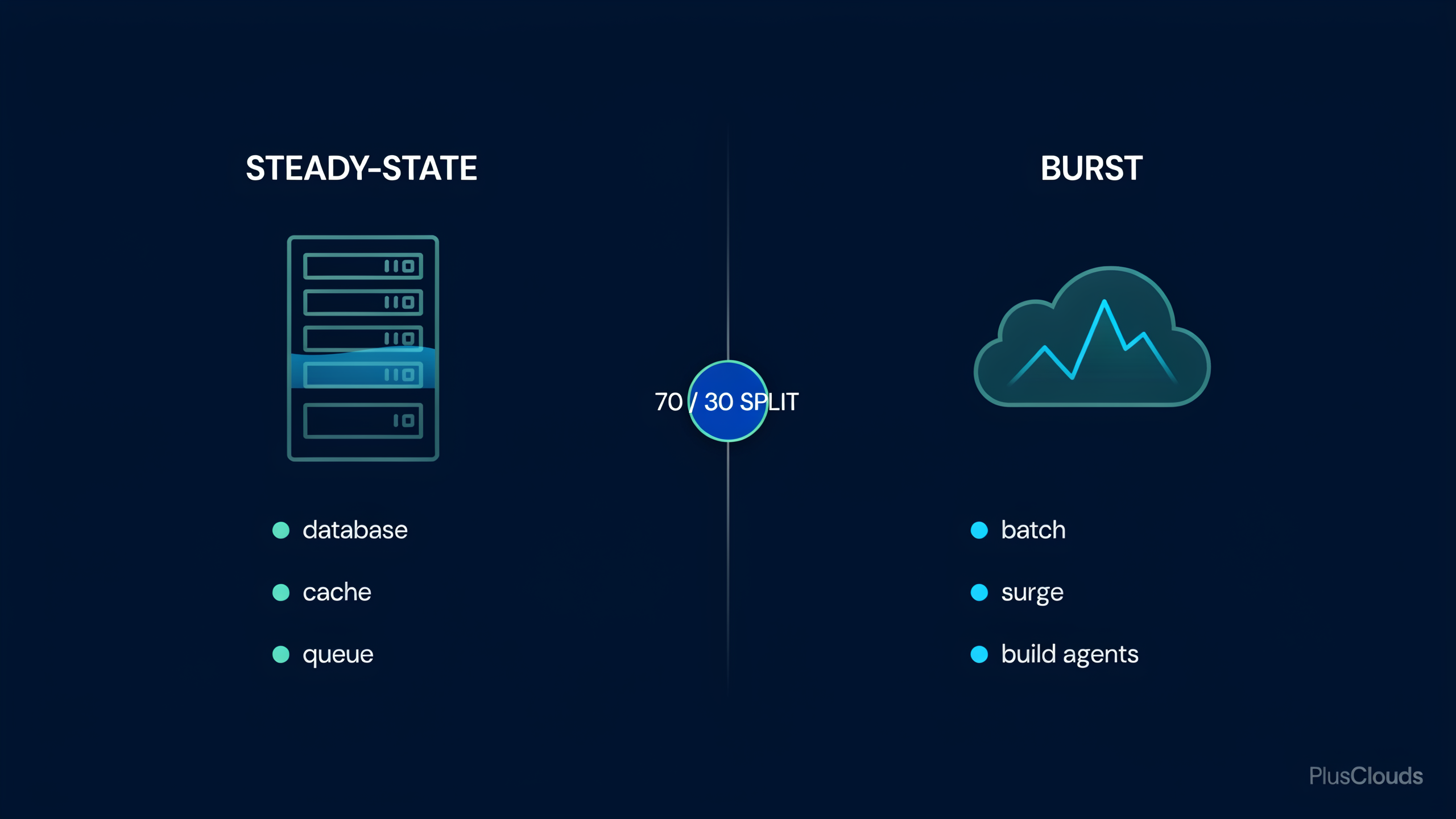
Before you touch a single server, sort every workload in your fleet into one of two buckets.
Steady-state workloads have flat, predictable resource consumption. Think primary databases, Kafka clusters, Redis, Elasticsearch, your main application tier at baseline traffic, CI runners that spin constantly. Their defining trait: utilization curves that barely move week to week. If you plotted CPU and memory over 30 days and the band stayed within 20% of its mean, it belongs here.
Burst workloads spike unpredictably or on a schedule. Batch rendering, ML training jobs, end-of-month report generation, marketing-driven traffic surges, canary deployments, ephemeral build agents. Their defining trait: they need capacity for minutes or hours, not months.
Most teams find the split lands around 70/30. Seventy percent of compute hours go to steady-state, thirty percent to variable load. That ratio matters because it tells you where the money is: the 70% is where you are overpaying every single hour.
A quick way to start the classification: pull 30 days of utilization metrics from your monitoring stack and compute the coefficient of variation for each service. Here is a small script that does it against Prometheus:
for svc in api postgres kafka redis; do
  cv=$(curl -s "http://prometheus:9090/api/v1/query?query=\
stddev_over_time(rate(cpu_usage{service=\"$svc\"}[1h])[30d:1h])\
/ avg_over_time(rate(cpu_usage{service=\"$svc\"}[1h])[30d:1h])" \
  | jq -r '.data.result[0].value[1]')
  echo "$svc CV=$cv"
done
A CV under 0.3 is steady-state. Over 0.6 is burst territory. Everything between needs a judgment call based on how badly it tolerates latency during scale-up.
Why Cloud VMs Win for Burst (and Where They Bleed You)
For burst workloads, elastic VMs are genuinely the right tool. A traffic spike at 2 PM on a Tuesday does not care that you could have provisioned a dedicated server in three weeks. It cares about the next 60 seconds. Cloud VMs deploy in under a minute, scale horizontally without capacity planning, and disappear when the spike ends. You pay only for what you consume, which is exactly the right pricing model for consumption that is genuinely spiky.
This is where PlusClouds Cloud Servers fit the burst tier directly: Linux and Windows VMs on AMD EPYC with NVMe storage, deployed in about 60 seconds, with full root access and zero egress fees. That last point is worth dwelling on. If your burst workloads move large datasets between the VM tier and your steady-state tier, egress fees alone can erase the cost advantage of any cloud provider. Zero egress changes the calculus for data-heavy burst patterns like batch ETL and model inference.
Where cloud VMs bleed you is simple: they are the wrong tool for the 24/7 tier. A database that runs at 35% CPU utilization every hour of every day is paying a 100% utilization price. Multiply that across your entire steady-state fleet and you get the bill that made you forward this article's opening paragraph to your finance lead.
Why Bare Metal Wins for Steady-State (60-70% Cost Difference Explained)
For steady-state workloads, dedicated hardware is not nostalgia. It is arithmetic.
The cost gap comes from three stacked layers that cloud VM pricing carries and bare metal does not:
- Hypervisor overhead. Virtualization typically costs 5-15% of raw performance, which you pay for but do not receive.
- Provider margin on elasticity. You are financing the provider's ability to give someone else instant capacity. If you never use that elasticity, you are paying an insurance premium on a risk you do not have.
- Per-unit pricing structure. Cloud pricing is metered per vCPU and per GB, priced to be profitable at partial utilization. Bare metal prices the whole machine, and a fully utilized machine is dramatically cheaper per unit of work.
The comparison guides published in 2026 converge on the same conclusion: for consistent, long-running workloads, bare metal delivers 60-70% lower total cost than equivalent cloud VM capacity (American Cloud, Hosted.cloud). Even against committed-use discounts, the gap stays wide because the committed discount prices a discounted premium, not a different cost structure.
Performance is the quieter half of the argument. A dedicated machine gives your database direct access to NVMe paths, full cache locality, and no noisy neighbors. We will quantify that shortly.
On the PlusClouds side, Bare-Metal X7000 and Leo CN servers cover both ends of the steady-state spectrum: the X7000 series for GPU-heavy and HPC-adjacent workloads like ML training that outgrew your burst tier, and Dell-certified Leo CN systems when you need dedicated hardware deployed on your own premises. The point is not the SKU. The point is that dedicated silicon exists at price points that make the 70% steady-state tier economically rational.
The Noisy-Neighbour Tax and Hypervisor Overhead in Production
Cost is only half the case. The other half is variance.
On a multi-tenant hypervisor, your p99 latency is not fully yours. A neighbor's garbage collection storm, a co-tenant's storage burst, a host-level live migration. Any of these can add tens of milliseconds to your tail latency without anything changing in your code. For a SaaS API, that shows up in your SLA dashboards as mystery spikes that correlate with nothing you deployed.
Single-tenant bare metal removes the neighbor variable entirely. Your p99 becomes a function of your own code and your own load. Teams that move latency-sensitive services (databases, real-time APIs, queue brokers) onto dedicated hardware routinely report tighter tail latencies purely from eliminating co-tenancy, before accounting for the raw performance recovery from hypervisor overhead.
The isolation question has a security dimension too. If you handle payment data or health records, tenancy model is a compliance control, not just a performance preference. We covered the tradeoffs in depth in our multi-tenant cloud vs. single-tenant bare metal comparison, and the short version is that single tenancy simplifies your audit story considerably.
How to Classify Your Own Workloads: A Decision Matrix
Here is a decision matrix you can apply in a single planning session. Score each workload against these five questions:
| Question | Yes → Bare Metal | No → Cloud VM |
|---|---|---|
| Does utilization stay within 20% of its 30-day mean? | Strong bare metal candidate | Burst candidate |
| Does it run 24/7 at baseline load? | Strong bare metal candidate | Burst candidate |
| Is tail latency (p99) contractual or customer-visible? | Bare metal | Either |
| Does it need to scale from 1 to 50 instances in minutes? | Poor fit for bare metal | Cloud VM |
| Is it stateful and hard to redistribute quickly? | Bare metal (stability wins) | Burst only if ephemeral |
Two rules of thumb that resolve the edge cases:
- Statefulness predicts placement. Databases, caches, and brokers hate being moved. Put them on metal and leave them there.
- Ephemerality predicts placement. Anything that lives less than a day belongs on VMs, no matter how big it gets.
Your typical resulting architecture: databases, primary app tier, and queues on bare metal; build agents, batch jobs, seasonal surge capacity, and canary environments on cloud VMs.
Running Both From One Control Plane: Networking, Storage, and Backup Unified
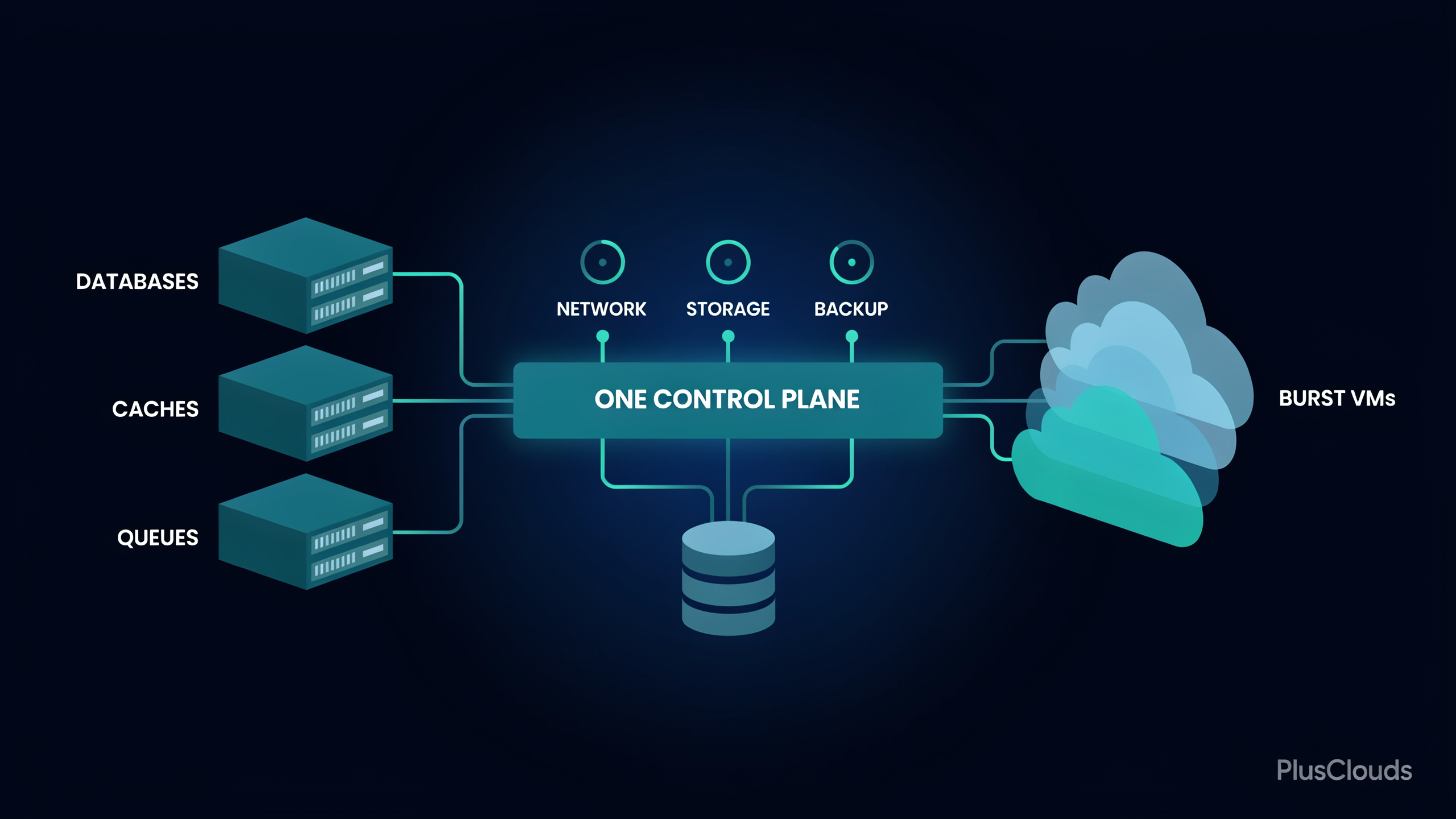
The historical objection to hybrid was operational: two environments meant two dashboards, two networking models, two backup regimes, and two on-call mental models. That objection is now solvable, and solving it is the difference between a hybrid architecture and a split-brain one.
Three things must be unified:
Networking. Your bare metal tier and your VM tier need to behave like one network. Private addressing across both, load balancers that can route to targets in either tier, and segmentation that treats the boundary as internal rather than a hard perimeter. PlusClouds Networking & Load Balancers provide five network types (public, private, VPN, management, DMZ) plus load balancers, all provisioned from the same control plane that manages your VMs and metal. A typical pattern: the private network carries replication and internal service traffic between tiers, the DMZ network fronts anything internet-facing, and the management network stays off the data path entirely.
Storage. Your burst tier needs fast access to the same data your steady-state tier owns. Pooled, standards-based storage prevents the classic failure mode where your VM batch jobs copy terabytes across a boundary on every run. PlusClouds Cloud Storage pools tiered HDD, SSD, and NVMe behind a single namespace, so a batch VM and a bare metal database can share a data plane without cross-cloud transfer games.
Backup. One backup policy across both tiers, with explicit RPO and RTO targets, is what makes the hybrid setup auditable. PlusClouds Automated Backup handles recovery with defined RPO/RTO targets, SLA tracking, and remote restore, which matters because a hybrid fleet multiplies the number of things that can drift out of your backup scope. If you operate in a regulated vertical, the design principles in our DORA Article 11 & 12 backup guide apply to hybrid fleets the same way they apply to single-cloud ones. And the 3-2-1-1 backup rule remains the baseline architecture regardless of where your compute sits.
Migration Path: Moving Steady-State Workloads to Bare Metal Without Downtime
Once your matrix is done, the migration follows a boring, repeatable sequence. Boring is the goal.
- Pick a low-risk, high-value first workload. Usually a read replica or a caching layer. You get real cost and performance data without betting production.
- Stand up the bare metal target and establish replication. For databases, native replication (streaming replication for Postgres, replica sets for Mongo) is your friend. Keep the cloud VM as primary initially.
- Cut over reads, then writes. Shift read traffic to the metal node first. Watch p99 and replication lag for a week. Then fail over writes during a low-traffic window with a rollback path that takes minutes, not hours.
- Move the stateless app tier behind the load balancer. This is the easy part. Add bare metal targets to your load balancer pool alongside VM targets and shift weights gradually.
- Keep the VM tier warm for burst. Do not decommission your autoscaling groups. Retarget them so they only spin when the metal tier approaches capacity, which is exactly the hybrid pattern working as designed.
The full version of this process, including cost-modeling the move and negotiating the exit, is covered in our hyperscaler-to-bare-metal repatriation playbook. The one-line version: migrate stateful workloads first, stateless second, and never migrate anything you cannot roll back in under 15 minutes.
TCO Model: Calculating Your Exact Break-Even Month
Executives do not approve architecture on vibes. They approve it on a spreadsheet. Here is the model that closes the deal.
Gather four numbers:
- S = monthly spend on steady-state workloads (cloud VM + committed discounts)
- B = monthly cost of equivalent bare metal capacity (hardware lease or colo-equivalent pricing)
- M = one-time migration cost (engineering hours × loaded rate + parallel-run overlap)
- G = monthly growth rate of steady-state spend (as a decimal)
Your monthly savings after migration are (S − B), and your break-even month is:
break_even_months = M / (S - B)Worked example. Suppose your steady-state fleet costs $40,000/month on cloud VMs with reserved commitments. Equivalent bare metal capacity prices at $14,000/month. Migration takes two engineers six weeks, roughly $60,000 all-in including parallel-run overlap.
Monthly savings:  $40,000 - $14,000 = $26,000
Break-even:       $60,000 / $26,000 ≈ 2.3 months
Under three months. And because G is positive, the savings compound: next year your steady-state bill would have grown to $48,000 on cloud while staying flat on metal (capacity headroom permitting), widening the gap further.
Two adjustments that make the model honest. First, add a burst-tier growth line: some workloads you migrate off VMs will instead grow into VM spend, so model burst spend separately and expect it to rise. Second, price the performance dividend. Tighter p99 on your database tier translates into either lower provisioned headroom or fewer latency-related incidents. You do not need to monetize it precisely; noting it as an unquantified upside is enough for most rooms.
If your broader cost picture needs work beyond this one decision, our practical cloud cost optimization guide for startups covers the full levers list, from rightsizing to commitment strategy.
What This Architecture Looks Like in Production
Assembled end to end, the pattern is unglamorous, which is exactly why it works.
Your databases, caches, message brokers, and baseline application tier run on bare metal. They see flat latency, full hardware performance, and a cost line that does not move when marketing runs a campaign. Your autoscaling tier lives on cloud VMs, spinning up for batch jobs, traffic surges, and ephemeral environments, paying only for hours consumed. Load balancers route across both tiers as if they were one fleet. Storage is pooled so data does not commute. Backups run on one policy with explicit recovery targets. One control plane, one network, one bill that finally makes sense.
The teams running this in 2026 did not get there with a grand replatforming. They got there with a decision matrix, one replica, and a spreadsheet that said break-even in month three. The architecture is not the hard part. Deciding to classify your workloads honestly is.
If you are evaluating this split for your own fleet, PlusClouds runs Cloud Servers, Bare-Metal (X7000 and Leo CN), networking, storage, and backup from exactly the kind of single control plane this playbook describes. Map your workloads, run the TCO model with your real numbers, and see what your break-even month looks like.